
Inbox & Calls
Guideline on how to Pin Filters
1. Select the filters you want to apply. 1. Click Pin Filter and give it a name. !Image To delete or rename pinned filters, click the edit icon next to your pinned filters. !Image…
Updated Apr 15, 2026
-
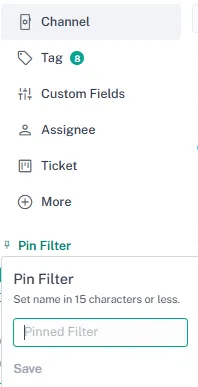
Select the filters you want to apply.
-
Click Pin Filter and give it a name.
❗ Note: Maximum 15 characters allowed for naming the pinned filter.
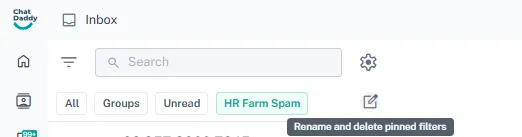
To delete or rename pinned filters, click the edit icon next to your pinned filters.
Use Cases
Stay Organized
- Easily sort and prioritize messages based on your needs, ensuring that no important inquiry is missed.
Boost Efficiency
- Quickly locate specific conversations, saving valuable time when responding to customers.
Simplify Workflows
- Customize your inbox view to focus on the most relevant interactions, streamlining your communication processes.
Feedback
Was this article helpful?