
Best Practices to avoid a Template Message rejection
If your WhatsApp template is rejected, it means Meta did not approve the message during review. This guide explains: - Where to check rejection details - Common Meta rejection erro…
Overview
If your WhatsApp template is rejected, it means Meta did not approve the message during review.
This guide explains:
-
Where to check rejection details
-
Common Meta rejection errors
-
How to correct and resubmit templates
Why Template Rejections Occur
Templates may be rejected due to:
-
Incorrect variable formatting
-
Violation of WhatsApp Business Policy
-
Promotional or spam-like content
-
Requests for sensitive information
-
Duplicate template submissions
-
Language mismatch
Meta evaluates every template before approval to ensure compliance.
How to Check Rejection Details in ChatDaddy
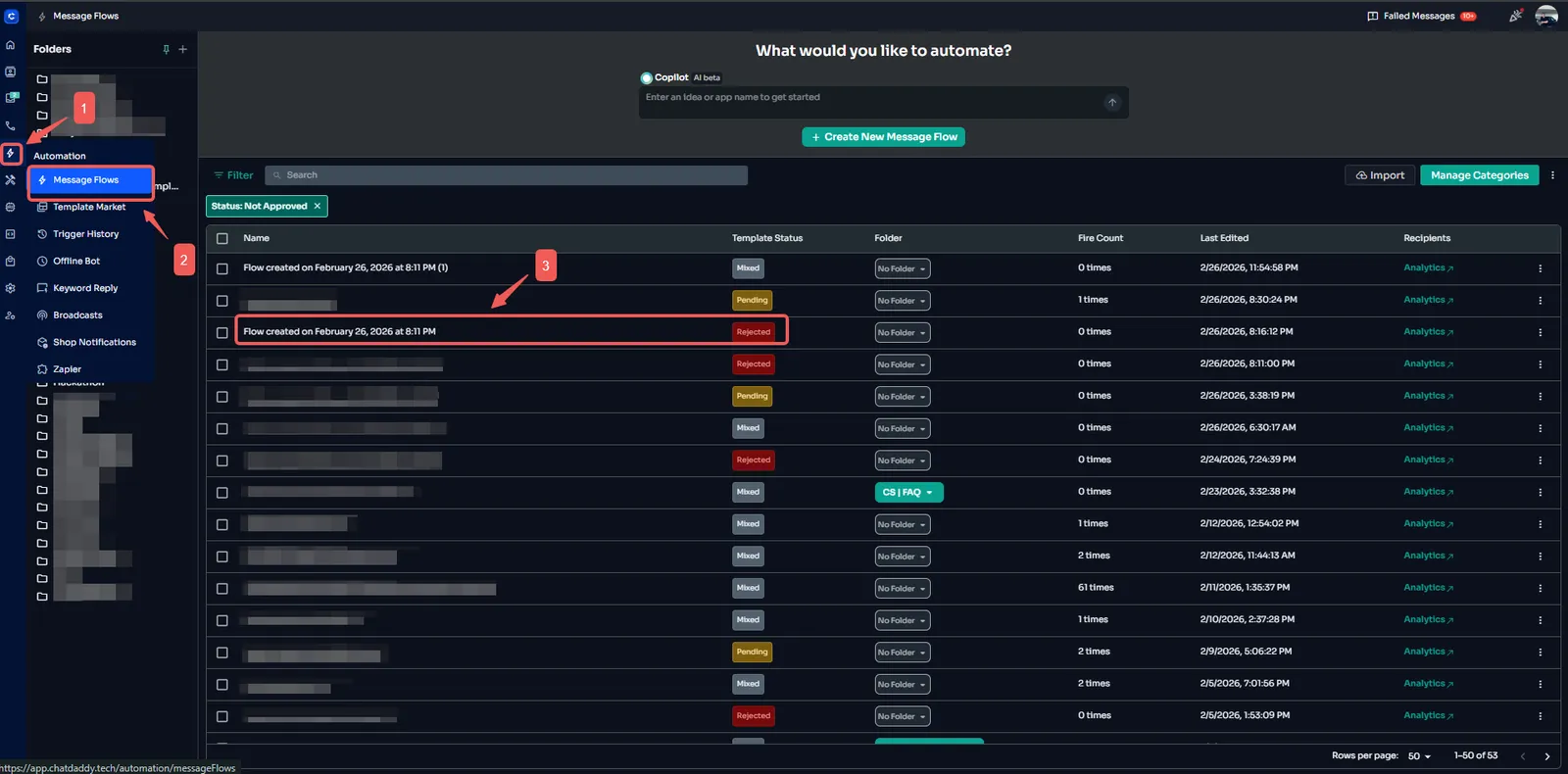
Step 1: Go to Automation → Message Flow → Open your flow
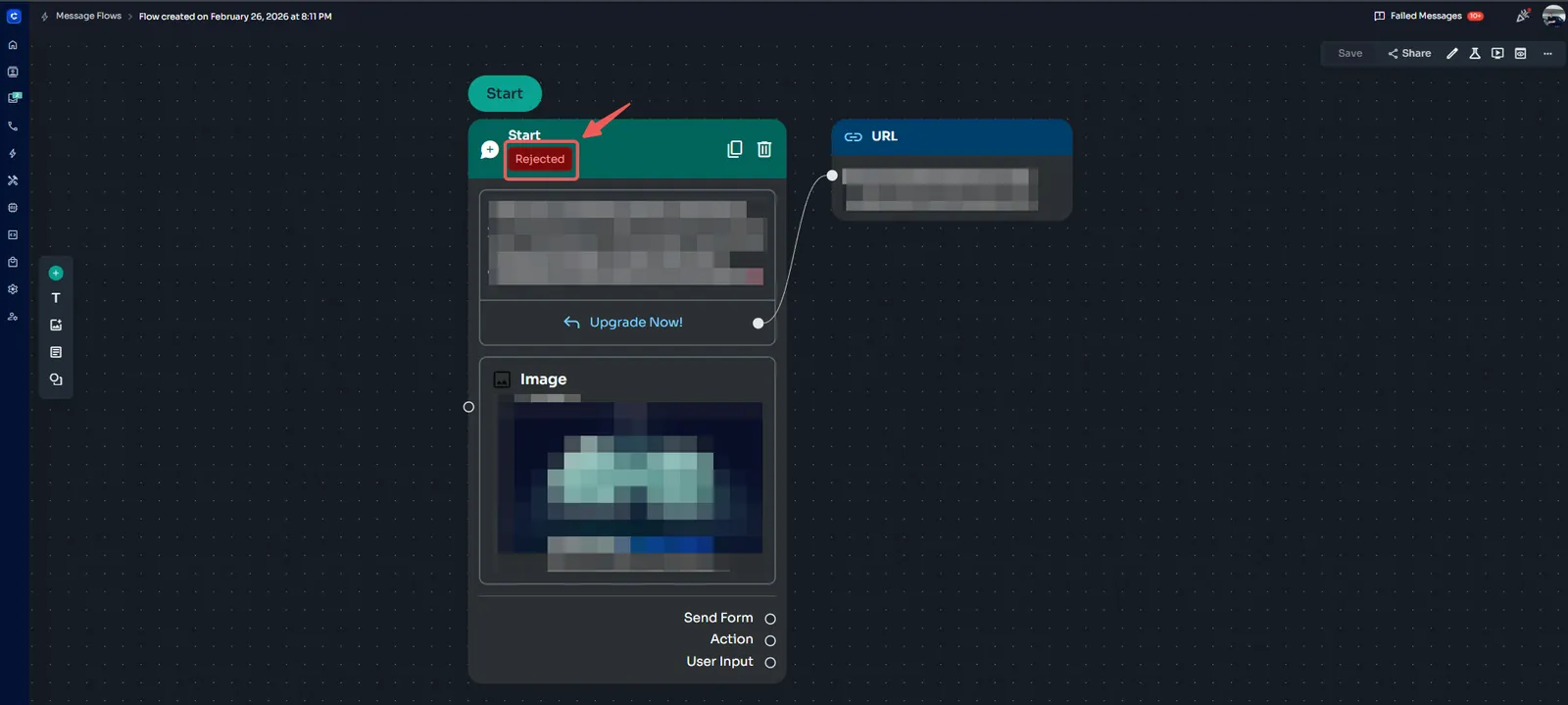
Step 2: Click the Status in the Message Node
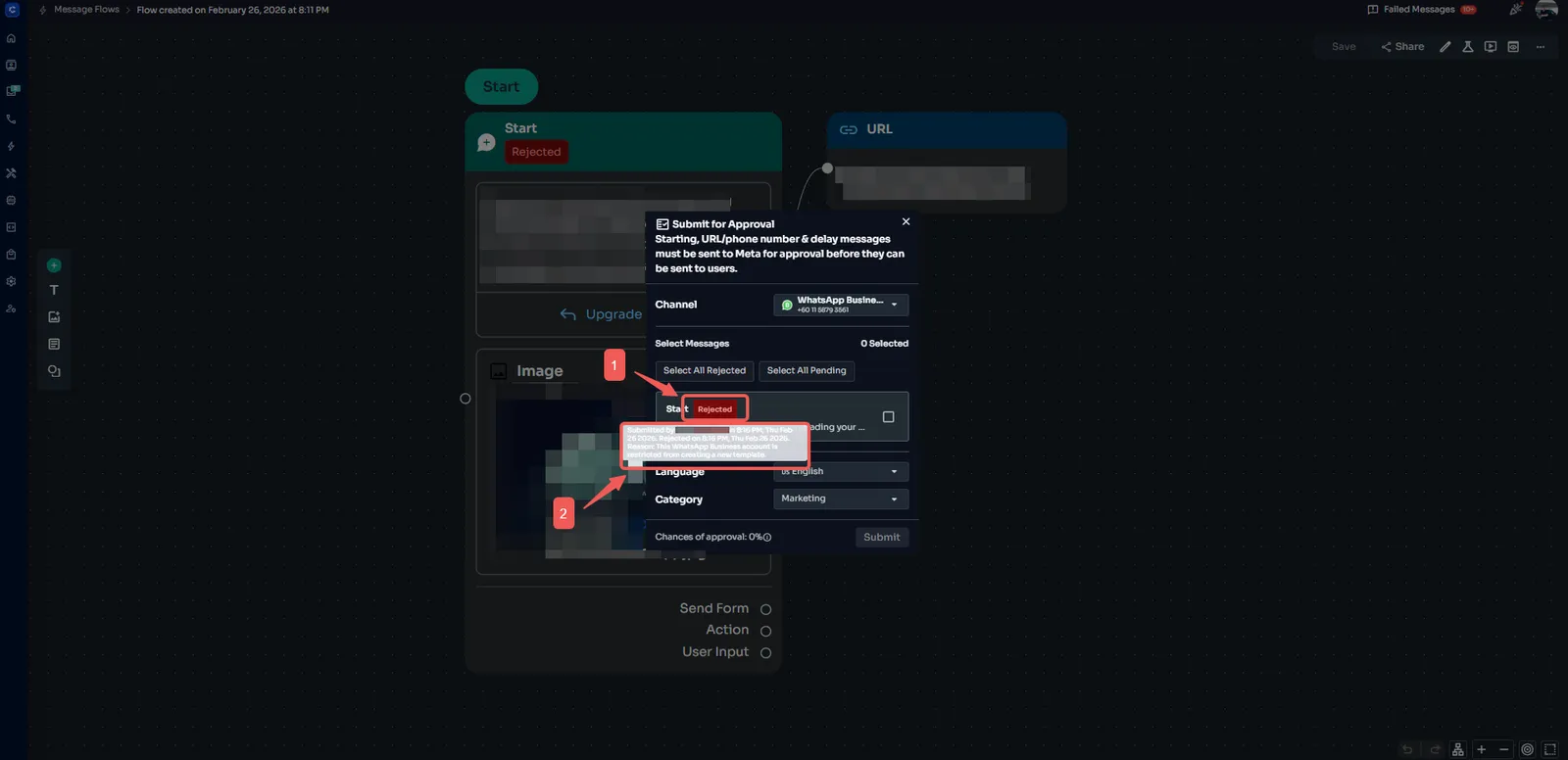
Step 3: A pop-up window will appear → Hover over the rejection message to view the full Meta error details
Common Meta Template Errors and Solutions
| Category | Error Code | Meaning / Rejection Type | Possible Cause / Description | Recommended Action |
|---|---|---|---|---|
| Authorization | 401 (0) | Unauthorized – Token expired | Access token expired | Generate new access token |
| Authorization | 401 (190) | Unauthorized – Token invalidated/revoked | Token revoked by user/app | Generate new access token |
| Authorization | 403 (10) | Forbidden – Permission denied | Missing permissions | Verify via Access Token Debugger |
| Authorization | 403 (200–299) | Forbidden – Number not allowed | Number not allowlisted (dev mode) | Add number to allowlist |
| Authorization | 404 | Recipient not on WhatsApp | Invalid/unregistered number | Verify number registration |
| Authorization | 500 | Internal Server Error | Server-side issue | Retry request |
| Authorization | 503 | Recipient not available | User blocked business | Troubleshoot or contact recipient |
| Integrity | 403 (368) | Temporarily blocked for policy violations | Policy violation detected | Refer to Policy Enforcement |
| Integrity | 403 (130497) | Business account restricted | Messaging limit exceeded | Review limits in Business Manager |
| Integrity | 401 (139000) | Account locked | Security issue | Verify in Business Manager |
| Validation | 400 (1) | API Unknown | Invalid request/server issue | Check request format |
| Validation | 400 (33) | Parameter value invalid | Unsupported value | Verify parameter format |
| Validation | 400 (100) | Invalid parameter | Incorrect parameter | Correct parameter |
| Validation | 400 (131008) | Required parameter missing | Missing field | Add required parameter |
| Validation | 400 (131009) | Parameter value not valid | Invalid format | Adjust parameter value |
| Validation | 400 (131021) | Recipient cannot be sender | Same sender & recipient | Use different recipient |
| Validation | 400 (131026) | Message undeliverable | Recipient unavailable | Verify number status |
| Media | 400 (131030) | Media upload error | Unsupported file | Use supported specs |
| Media | 400 (131031) | Media download error | Media unavailable | Reupload/verify URL |
| Messaging | 400 (131047) | Re-engagement required | Outside 24-hour window | Use template message |
| Messaging | 400 (131048) | Meta does not deliver | Integrity violation | Review compliance |
| Messaging | 400 (131050) | User opted out | User unsubscribed | Respect opt-out |
| Template | 400 (131051) | Unsupported message type | Unsupported type | Use supported type |
| Template | 400 (131052) | Template format mismatch | Format incorrect | Follow approved format |
| Template | 400 (131053) | Template parameter mismatch | Variable mismatch | Match template variables |
| Template | 400 (131054) | Template paused | Low quality rating | Improve template |
| Template | 400 (131055) | Template disabled | Policy violation | Create compliant template |
| Template | 404 (132000) | Template not found | Not approved/misspelled | Verify template name |
| Flow | 400 (131056) | Flow blocked | Misconfiguration | Reconfigure flow |
| Flow | 400 (131057) | Flow throttled | High traffic | Retry later |
| Security | 400 (131058) | Two-step PIN mismatch | Incorrect PIN | Reset PIN |
| Security | 400 (131059) | Re-verification needed | Number not verified | Complete verification |
| Security | 400 (131060) | Too many PIN guesses | Excess attempts | Wait before retry |
| Security | 400 (131061) | PIN guessed too fast | Rapid attempts | Retry after delay |
| Registration | 400 (131062) | Phone not registered | Not on WhatsApp | Register number |
| Registration | 400 (131063) | Wait before re-registering | Recently deleted | Wait before retry |
| Payments | 400 (131064) | Payments TOS not accepted | Terms not accepted | Accept in Business Manager |
| Permission | 403 (131031) | Access denied | Missing permissions | Update app permissions |
| General | 400 (131065) | Generic user error | Unknown issue | Check error details |
| System | 500 | Something went wrong | Temporary issue | Retry later |
| System | 503 | Service unavailable | API downtime | Check system status |
| Rate Limit | 429 (4) | API too many calls | Rate limit exceeded | Apply exponential backoff |
| Rate Limit | 400 (80007) | Rate limit issues | App-level limit | Reduce API frequency |
| Rate Limit | 403 (80004) | Business messaging limit hit | Tier limit reached | Increase messaging tier |
| Rate Limit | 403 (80008) | Register/Deregister limit hit | Too many attempts | Wait before retry |
| Other | — | Variable Formatting Error | Incorrect variable format | Use correct syntax: {{1}}, {{2}} (no spaces) |
| Other | — | Invalid Variable Content | Special characters or spacing inside variables | Remove symbols and keep variables short |
| Other | — | URL Policy Violation | Use of shortened links | Replace with full official URL |
| Other | — | Content Policy Violation | Restricted or spam-like content | Remove promotional or non-compliant wording |
| Other | — | Sensitive Information Request | Asking for confidential data | Remove financial or personal data requests |
| Other | — | Duplicate Template | Similar template already exists | Revise wording before resubmission |
| Other | — | Language Mismatch | Incorrect language selected | Ensure template matches selected language |
| Other | — | Abusive or Aggressive Tone | Message flagged as threatening | Maintain professional neutral tone |
| Other | — | Excessive Promotional Content | Message overly sales-focused | Adjust to transactional/service tone |
How to Fix and Resubmit a Rejected Template
-
Edit the template within ChatDaddy
-
Address the specific issue mentioned in the rejection reason
-
Save and resubmit
-
Wait for Meta’s review decision
Avoid resubmitting without correcting the issue, as repeated rejections may impact approval performance.
Best Practices to Prevent Rejection
-
Keep messages clear and professional
-
Use correct variable formatting
-
Avoid excessive capitalization or emojis
-
Do not request confidential information
-
Ensure the message aligns with a legitimate business purpose