
Understanding the 24-Hour Messaging Window
!Image Co-Existence allows you to: - ✅ Keep using WhatsApp Business App on your phone - ✅ Connect the same number to the official Cloud API - ✅ Use automation, chatbot, CRM, broadc…
1️⃣ What Is WhatsApp Co-Existence?
Co-Existence allows you to:
-
✅ Keep using WhatsApp Business App on your phone
-
✅ Connect the same number to the official Cloud API
-
✅ Use automation, chatbot, CRM, broadcast
-
✅ Stay compliant with Meta rules
Once connected to API, Meta’s messaging rules apply.
The most important one is the 24-Hour Window Rule.
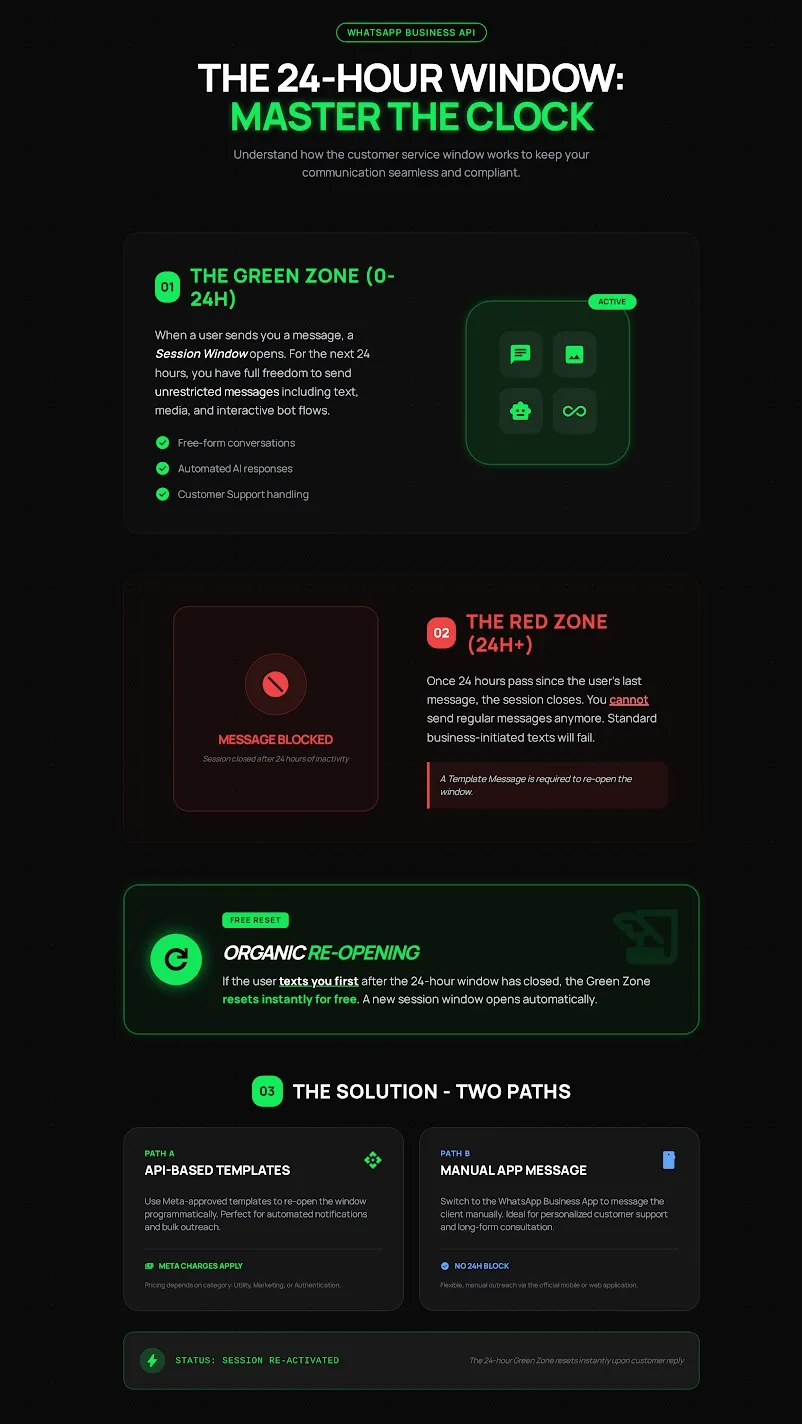
2️⃣ What Is the 24-Hour Window?
The 24-Hour Window is a rule set by Meta.
It controls when you can freely reply to customers.
Simple Explanation
When a customer sends you a message:
🟢 A 24-hour session opens.
During these 24 hours, you can:
-
Send normal text
-
Send images
-
Send voice notes
-
Send links
-
Use chatbot
-
Use automation
No restriction.
3️⃣ The Green Zone (0–24 Hours)
This is called the Green Zone.
Status: ACTIVE
If the customer messaged you within the last 24 hours:
✅ You can reply freely
✅ No template needed
✅ Automation works normally
Think of it as:
The customer started the conversation, so you can talk normally.
4️⃣ The Red Zone (After 24 Hours)
If 24 hours pass without the customer replying:
🔴 The session closes.
You cannot send normal messages anymore.
If you try to send:
“Hi, just checking.”
❌ It will fail.
This is not a bug.
This is Meta’s compliance rule.
5️⃣ How to Re-Open the Conversation
You have 2 ways.
Option A — Send a Template Message
You must send a Meta-approved template.
Example:
“Hi {{name}}, we’re following up on your enquiry.”
When the customer replies:
🟢 A new 24-hour window opens.
Note:
Templates are usually charged by Meta.
Option B — Customer Messages You First
If the customer sends you a message again:
🟢 The 24-hour window resets automatically.
No template needed.
No charge for reopening.
This is called an organic reset.
6️⃣ Does This Apply to WhatsApp Business App?
If you are using only the WhatsApp Business App (no API):
This rule does not apply.
If your number is connected to the API via Co-Existence:
This rule applies.
7️⃣ Cost Impact
Inside 24 hours:
- Charged as service conversation
Outside 24 hours (template sent):
- Charged as business-initiated conversation
Pricing depends on:
-
Country
-
Template category (Marketing, Utility, Authentication)
8️⃣ Common Mistakes
❌ Sales replies after 24 hours without template
❌ No reminder before window expires
❌ No template prepared
❌ Thinking delivery failure is a system bug
Result:
-
Message fails
-
Lead lost
-
Confusion
9️⃣ Best Practice
To avoid problems:
-
Track last customer message time
-
Set reminder at 23 hours
-
Prepare follow-up templates
-
Train sales team on this rule
Golden rule:
If customer silent for more than 24 hours → use template.
🔟 Quick Summary
| Situation | Can Send Normal Message? |
|---|---|
| Customer messaged within 24h | ✅ Yes |
| 24h passed, no reply | ❌ No |
| Customer messages again | ✅ Yes |