
Understanding the Options
- Reschedule & Send Every 5 Minutes: Sends pending messages gradually at 5-minute intervals to reduce the risk of being flagged or banned. - Delete All Pending Messages: Removes al…
-
Reschedule & Send Every 5 Minutes: Sends pending messages gradually at 5-minute intervals to reduce the risk of being flagged or banned.
-
Delete All Pending Messages: Removes all pending/scheduled messages before reconnecting. Recommended for high backlog situations.
-
I Understand. Resend All Immediately: Sends all pending messages right away after reconnecting. This carries a higher risk of being flagged or banned.
Clearing Failed Messages
Failed messages are those that were not sent due to errors and differ from pending messages. Follow these steps to clear failed messages:
-
Click on the user menu button in the top-right corner and select Failed Messages.
-
A list of all failed messages will appear.
-
Resend individual messages by clicking the Send Message button next to each failed message.
-
Alternatively, clear specific failed messages or take bulk actions:
-
Clear All: Deletes all failed messages.
-
Resend All: Resends all failed messages (⚠ This may pose a risk of being flagged or banned).
-
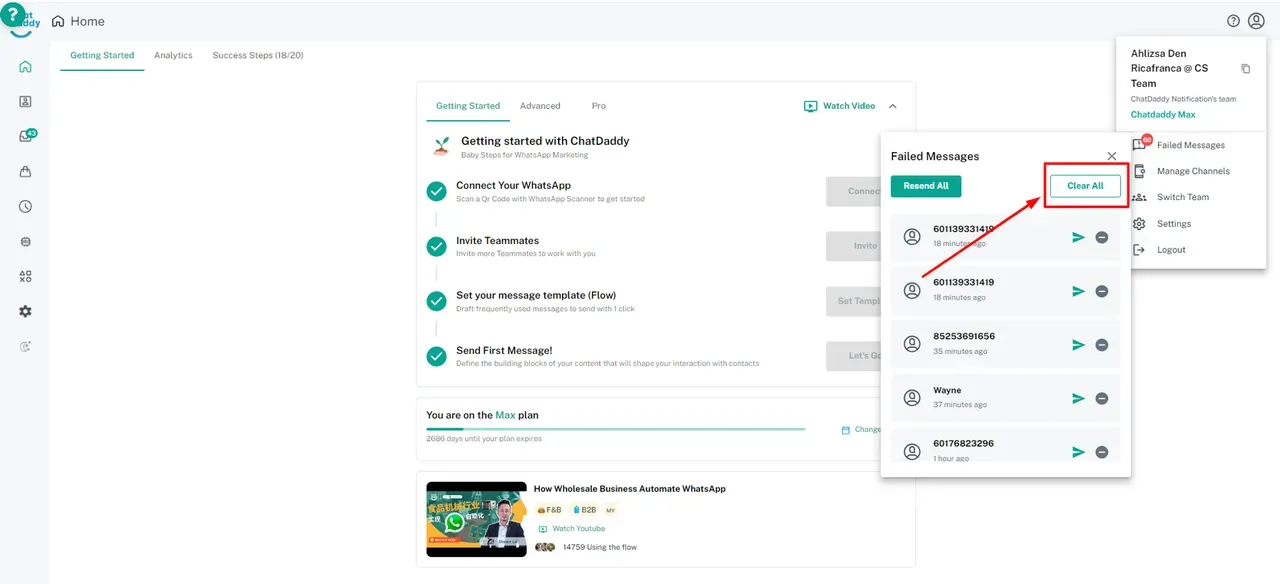
- Click on Clear All to delete all failed messages.
Additional Resources
For instructions on clearing pending messages for a specific chat, refer to this help document.