
Understanding WhatsApp LID (@lid)
LID (Link ID) is a new identifier used by WhatsApp to hide a user's phone number. Instead of: plain text 56985037389@s.whatsapp.net you may now see: plain text 15230822099072@lid -…
✨ What Is @lid?
LID (Link ID) is a new identifier used by WhatsApp to hide a user's phone number.
Instead of:
56985037389@s.whatsapp.net
you may now see:
15230822099072@lid
Key points
-
LID is created by WhatsApp, not ChatDaddy.
-
It is assigned per WhatsApp account, NOT per group.
-
The same user will always show the same LID across chats.
-
It is part of WhatsApp's ongoing privacy update.
📍 Where Does @lid Appear?
WhatsApp now shows @lid in:
1. Group Chats & Communities
This happens when:
-
Admins enable “Hide phone numbers”, or
-
The conversation is part of a Community with stricter privacy.
2. Individual Chats (New WhatsApp Behavior)
WhatsApp recently began masking phone numbers in 1:1 chats, even with:
-
Existing contacts
-
Saved numbers
-
Previously normal conversations
👉 This is entirely controlled by WhatsApp, not by ChatDaddy.
🔒 Why Is WhatsApp Using LIDs?
WhatsApp is upgrading privacy protections. When a phone number is hidden:
-
WhatsApp replaces the number with a LID
-
Only WhatsApp’s system and the contact owner can see the real number
-
ChatDaddy receives the same masked data that WhatsApp sends
Because the data comes from WhatsApp already masked, it cannot be unmasked or corrected from our side.
📌 Important: This Does NOT Affect Your ChatDaddy Operations
-
You can still message @lid users normally
-
Messages still deliver successfully
-
Automation, inbox assignment, and replies all work
-
Only the displayed identifier is affected
This is not an error, but WhatsApp returning restricted or “corrupted” placeholder data during their rollout.
🖼 Example of How It Looks in ChatDaddy
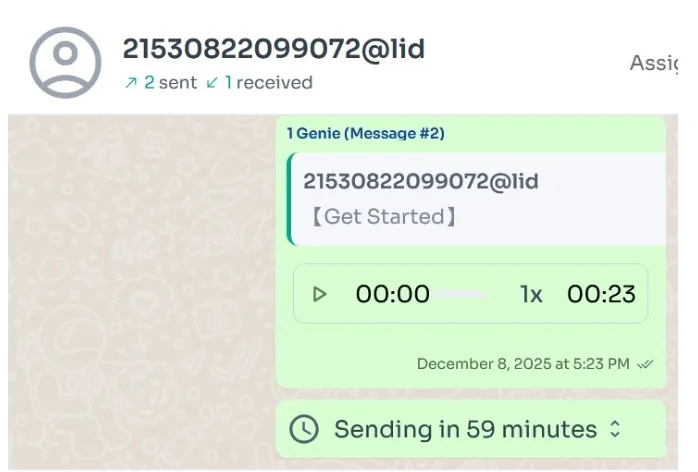
This is expected behavior during WhatsApp's privacy update rollout.
🛠 Can ChatDaddy Fix This?
Unfortunately no — because:
-
WhatsApp is deliberately masking the numbers
-
The LID is generated and enforced by WhatsApp
-
ChatDaddy cannot override or modify WhatsApp’s returned data
We are monitoring the rollout, but this behavior is controlled fully by WhatsApp.
📘 Summary
-
@lid is a new, privacy-focused identifier from WhatsApp
-
It appears in both group chats and individual chats
-
It does not cause message or automation failures
-
It cannot be removed or fixed from ChatDaddy’s side